

/Boxes/TissueBox.foocad
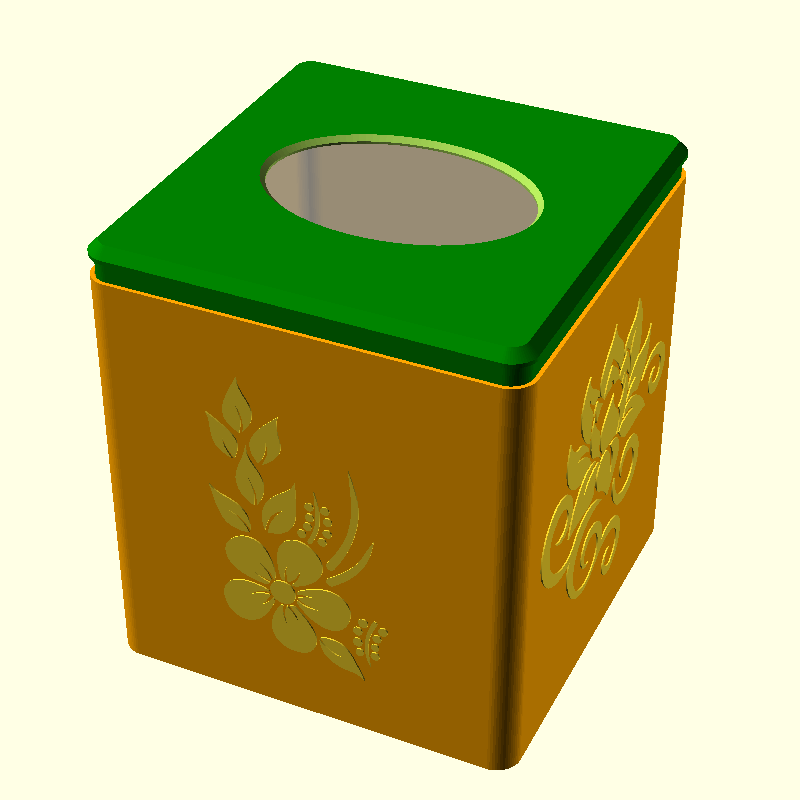
A square tissue box with rounded corners, chamfered top/bottom edges and a pattern on each face.
Printed in two parts, the main body, and a lid. I considered making the "lid" at the bottom, but then picking up the box may let the tissues fall out the bottom! Also, I like printing the top in a different colour to the main body.
The default size fits Wilko's own-brand tissues. Kleenex are smaller, not square and more expensive! Not recommended ;-)
The lid should have an "interferance" fit with the main body. Adjust "slack" appropriately. If it is too loose, add a little masking tape on the lid's lip. Too loose and the lid will lift each time you take a tissue.
Print Notes
I always have bed adhesion problems with largish boxes. The corners always lift. I used a 1st layer temp of 205 C, 65 C bed temp for all layers, a 10mm brim, as well as 10 mm ears. Using a PEI surface with glue stick. It worked - no lifting at all.
Possible Improvements
- Make the lid clip on
- Add a "frame" around the pattern - a rectangular indent/outdent.
import static uk.co.nickthecoder.foocad.chamferedextrude.v1.ChamferedExtrude.*

class TissueBox : AbstractModel() {

    @Custom
    var boxWidth = 120

    @Custom
    var boxDepth = 120

    @Custom
    var boxHeight = 127

    // The gap between the lid and the main piece. If you want an interferance fit,
    // then this must be tuned to your printer. A qhigh uality printer will need a
    // smaller value than a low quality printer.
    @Custom
    var slack = 0.25

    // You can make these @Custom too if you wish!

    var thickness = 1.2

    var topThickness = 3.0

    var baseThickness = 3.0

    var chamfer = 3

    var bottomChamfer = 2.0

    var round = 6

    var lip = 10

    var patternDepth = 0.4

    // Diameter of an additional circle at each corner to aid bed adhesion.
    // Set to zero if you don't want ears.
    // I used a brim as well as ears, but for my next print, I will try just a brim.
    var ears = 0

    // End of custom values.

    // The hole for the tissues.
    // This is just slightly smaller than the hole in Wilko's tissues.
    fun hole() : Shape2d = Circle( boxWidth/2 ).sides(120).scale( 0.65, 0.45 )

    // The shape of the box seen from above. This is the internal dimensions,
    // Using the boxWidth and boxDepth, with a 1mm gap.
    fun profile() : Shape2d {
        val width = boxWidth + (thickness + 1 ) * 2
        val depth = boxDepth + (thickness + 1 ) * 2

        return Square( width, depth ).center()
            .roundAllCorners( round )
    }

    // The main part of the box (the lid is separate).
    // Built using an extrusion of profile().
    // We start at the bottom, to the top, then back down again to hollow out the
    // box.
    // A pattern is added to the sides from an SVG file. The file contains other
    // flowers, so replace "flower1" with the id of another flower, or use a
    // competley different design.
    // In Inkscape, press Ctrl+Shift+O in inkscape to see/set the id of the currently
    // selected object. Note, the object must NOT be a group.
    // The pattern is ebossed on two sides, and sticks out on the other two.
    // Change the minus/plus depending on your preferences (I prefer it sticking out).
    @Piece
    fun main() : Shape3d {

        val height = boxHeight + baseThickness + 1
        val width = boxWidth + (thickness + 1 ) * 2
        val depth = boxDepth + (thickness + 1 ) * 2

        val body = ExtrusionBuilder().apply {
            crossSection( profile().offset( thickness -bottomChamfer ) )
            forward( bottomChamfer )
            crossSection( bottomChamfer )
            forward( height - bottomChamfer )
            crossSection()
            crossSection( -thickness )
            /*
            // Makes a thicker part near the top for stength only.
            // Alas, this caused a visible line on the front, so I've removed it.
            forward( -lip - slack )
            crossSection()

            crossSection( -1 )
            forward( -3 )
            crossSection()
            forward(-1)
            crossSection( 1 )
            */
            forward( -height + bottomChamfer + baseThickness )
            crossSection()
            forward( -bottomChamfer )
            crossSection( -bottomChamfer )

        }.build()

        val shapes = SVGParser().parseFile( "flowers.svg" ).shapes

        var pattern1 : Shape2d = shapes["flower1"]
        pattern1 = pattern1.scale( height*0.7 / pattern1.size.y )

        var pattern2 : Shape2d = shapes["flower2"]
        pattern2 = pattern2.scale( height*0.7 / pattern2.size.y )

        val carve1 = pattern1.extrude( patternDepth * 2 ).center()
            .rotateX(90)
            .translateZ( height / 2 )
        val carve2 = pattern2.extrude( patternDepth * 2 ).center()
            .rotateX(90)
            .rotateZ(90)
            .translateZ( height / 2 )

        // Change "+" to "-" for the patterns to be recessed.
        return body.color("Orange") +
            carve1.translateY(depth/2 + thickness).rotateZ(180).also() +
            carve2.translateX(width/2 + thickness).rotateZ(180).also()
    }

    @Piece
    fun lid() : Shape3d {

        val solid = ExtrusionBuilder().apply {
            crossSection( profile().offset( thickness -chamfer ) )
            forward( chamfer )
            crossSection( chamfer )
            forward( thickness )
            crossSection()
            crossSection( -thickness-slack )
            forward( lip )
            crossSection()
            crossSection( -1 )
            forward( -lip -1 )
            crossSection()
            forward( -chamfer+topThickness -1)
            crossSection( -chamfer+topThickness -1)
        }.build().color("Green" )

        val hole : Shape3d = hole()
            .chamferedExtrude(topThickness+0.2, -topThickness/2, 0)
            .translateZ(-0.1)

        return solid - hole
    }

    fun ears() : Shape3d {
        return Circle( ears ).translate( boxWidth/2, boxDepth/2 ).extrude( 0.2 )
            .mirrorX().also()
            .mirrorY().also()
            .color( "GhostWhite" )
    }

    @Piece( printable = false )
    override fun build() : Shape3d {

       return main() +
            lid().mirrorZ().translateZ(boxHeight + thickness + chamfer + 10) +
            Cube( boxWidth, boxDepth, boxHeight )
                .centerXY().translateZ( baseThickness )
                .previewOnly()
    }
}